Hello Folks,
I just installed 2014 SQL Instance and configured max and min memory settings and in hurry i did not see what the max value is set to, guess what it was too low 128MB which is lower than minimum memory accepted by SQL Engine and all the errors followed.
Event Viewer Messages :
Event ID : 18053 with below error messages ….
Error: 17312, Severity: 16, State: 1. (Params:). The error is printed in terse mode because there was error during formatting. Tracing, ETW, notifications etc are skipped.
Error: 17300, Severity: 16, State: 1. (Params:). The error is printed in terse mode because there was error during formatting. Tracing, ETW, notifications etc are skipped.
Error: 33086, Severity: 10, State: 1. (Params:). The error is printed in terse mode because there was error during formatting. Tracing, ET W, notifications etc are skipped.
Solution :
Steps:
- Put the SQL Server in single user mode by adding -f ( this will work same as -m mode with minimum resources required for engine to start)
- use CMD or Power Shell ( Run as Administrator ).
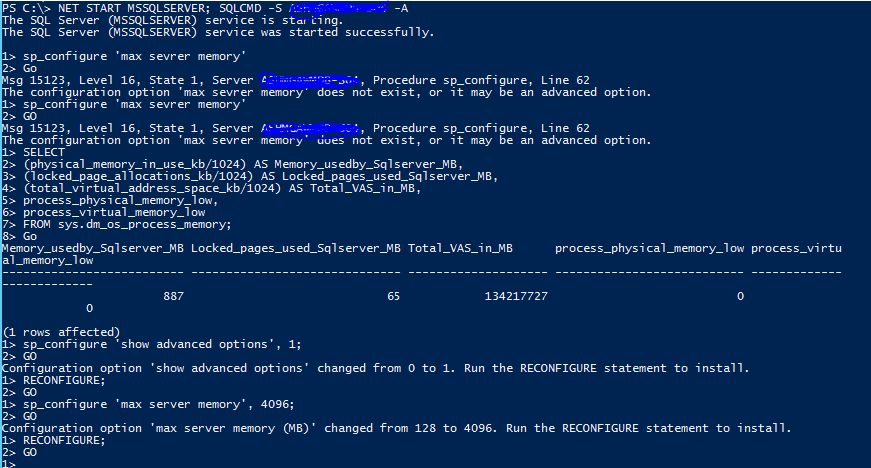
- execute the command NET START MSSQLSERVER ; sqlcmd -S -A.
- all the above command in single line if not one the SQL is started it will only accept single thread in single user mode.
- once we are in prompt execute the command below…
- sp_configure ‘show advanced options’, 1;
GO
RECONFIGURE;
GO
sp_configure ‘max server memory’, 4096;– 4gb of ram
GO
RECONFIGURE;
GO - Then check the value set.. execute the command below
- use master
select * from sys.sysconfigures where config=’1544′;
GO - NET STOP MSSQLSERVER
- Remove the “-f” from the startup parameters.
- Restart the service and check the instance is up and running.
That’s it you are back on track.
 SQLSERVERLABS
Leave a comment